
Best Video Email Software for Sales: There Is No Inbox Player, So Win the Thumbnail
By Pitchlane team · August 29, 2026 ·
The best video email platform for sales is Pitchlane if you email lists, because it builds a thumbnail, link and landing page for every lead from one recording. Video email software sells a picture of a video playing in the inbox, and that isn’t what happens. Gmail doesn’t support it at all. What your prospect sees is an image with a play button that links to a web page.
So the product you’re buying comes down to three things: the image in the email, the page behind the click, and how many hours it takes to produce one per lead. Judge every platform on those, and most of the feature comparison disappears.
What actually arrives in a video email?
Almost always a linked preview going to a hosted page. Here are all the ways of doing it, and why only one of them is worth your time for outbound.
| Method | What the prospect gets | Where it plays | The catch |
|---|---|---|---|
| Attachment | A file to download | Their media player | Heavy, suspicious, and Gmail swaps anything over 25 MB for a Drive link |
| Plain link | A URL | Hosted page | Safe and light, and nothing visual to earn the click |
| Static thumbnail | Image with a play icon | Hosted page | Works everywhere, sits still |
| Animated GIF | Moving preview, linked | Hosted page | Older Outlook on Windows doesn’t animate it, so the first frame has to work as a still |
HTML5 <video> | A player, sometimes | Inbox, sometimes | About 24% support; Gmail strips the tags |
Use a personalized GIF going to a personalized landing page. Make the first frame your face over the prospect’s own website, since that frame is what an Outlook user sees and what anyone sees while deciding whether to click. A generic play button on a stock frame tells them it’s a mail merge. Their homepage tells them it isn’t. The best way to email a video is to not email a video. Email a reason to click.
Which video email software should a sales team buy?
The dividing line is whether someone records each video. Prices as of November 2026.
| Platform | Who records | What’s different per lead | Sends through | Price | Free option |
|---|---|---|---|---|---|
| Pitchlane | You, once | Background website, GIF, landing page, name in email and title | Instantly, Smartlead, lemlist, HubSpot, Apollo and 20+ others | $37/month for 250, $67 for 500 | 14-day trial, 250 videos |
| BombBomb | A rep, each time | Whatever they say on that take | Gmail and Outlook plugins, Outreach, Dynamics | $36 to $42 per user/month | Free trial |
| Hippo Video | Recording plus automation | Name, image, text, website or LinkedIn background | CRM and email integrations | $20 to $80 per user/month, 100 to 500 videos per user | 50 videos/month |
| Vidyard | A rep, or an AI avatar | Take or avatar script | HubSpot, Salesforce, Salesloft, Gmail | $59 to $89 per seat/month, Video Agent $24 to $29 more | 5 recordings/month |
| Loom | A rep, each time | Whatever they say on that take | Paste it into your email | From $18 per user/month | 25 videos, 5 minutes each |
Pitchlane: for anyone emailing more than 20 people a week
You record once and Pitchlane produces the whole email asset per lead: a personalized GIF with the prospect’s site on it, a video with your recording over that site, and a branded landing page with a booking link. Your sequencer merges them into the campaign. The recording doesn’t speak the prospect’s name, since it’s your real voice for all of them; the name goes in the subject, the email and the video title, which is where people read it first anyway.
Because the sending stays in Instantly or Smartlead, you keep your mailboxes, warmup and reply handling. Nothing new touches your deliverability except the links, and a custom hosting domain puts those on your own domain.
BombBomb: the best inbox plugin for people recording by hand
BombBomb has the widest set of recording surfaces here: Gmail and Outlook plugins, browser extensions, and iOS and Android apps. That makes it the straightforward answer to “which video messaging software works inside Gmail and Outlook”, and also explains its limit. Living inside the compose window means it thinks one email at a time. A sales team on a 2,000-lead sequence never opens the compose window.
Hippo Video: real automation with a per-user cap
Hippo Video automates names, images and website backgrounds, which puts it closer to Pitchlane than anything else in this table. The catch is that volume follows the seat. On Teams, $60 to $75 a user buys 300 videos. Pitchlane’s $67 buys 500, regardless of how many people are sending.
Vidyard: a platform for a CRM-led sales floor
For a floor of AEs doing one-to-one follow-up from Gmail and a CRM, Vidyard is a solid hand recorder with strong analytics, at $59 per seat or more. For volume, its route is an AI avatar, so your prospect is watching a generated you. We’ve made the full case against that for outbound in our Vidyard alternatives breakdown.
Loom: free, quick and built for your team
Loom is the fastest way to make one video and it’s free for your first 25. It’s a good way to find out whether you enjoy being on camera. As a sales channel, it’s a recorder with no list import, no per-lead asset and nothing merging into a sequence. Our Loom alternative page goes through that side by side.
A 10-contact Pitchlane run, start to finish
On October 7, 2026 we took a 10-record test segment through Pitchlane to the point of sending, using non-customer test addresses and public websites. One pitch, fixed for all of them.
- Created the campaign and chose the recording.
- Imported 10 records, mapping first name, last name, company, email and website.
- Reviewed the test video before approving the batch.
- Checked the landing page and the website mapped to each record.
- Reached Send Videos, where the integration or CSV takes over.
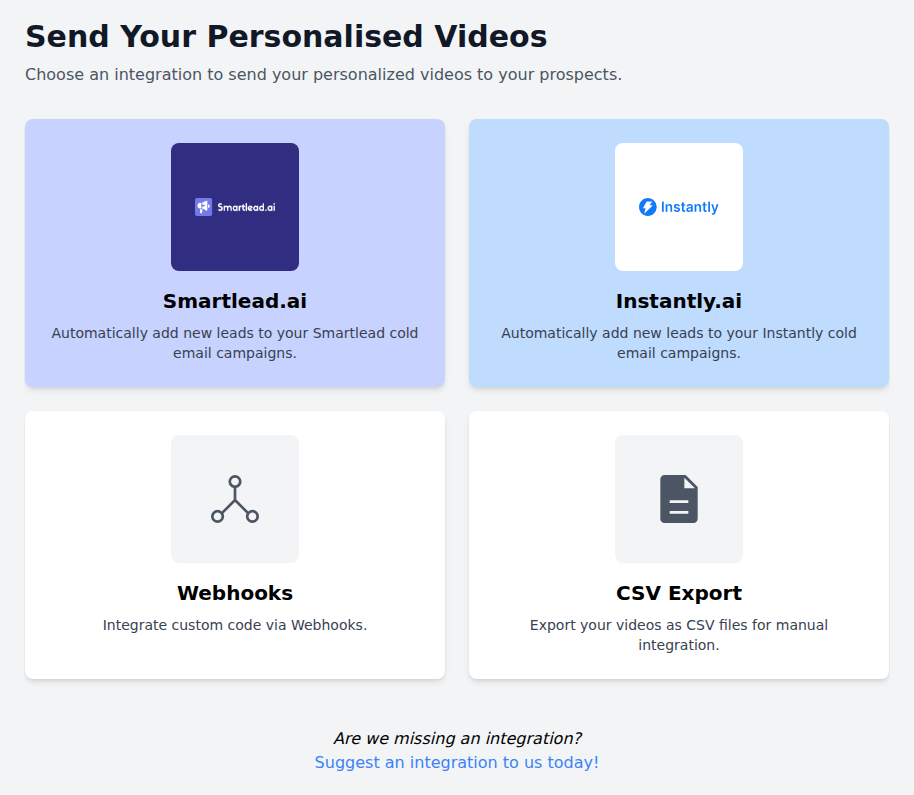
The voice stayed identical across all ten and the website behind it changed per record, which is the whole trick. The handoff screen gives you four exits: Smartlead, Instantly, webhooks and CSV.
That’s the part a hand recorder can’t copy, because it never had a list in the first place. The video prospecting playbook has the script, sequence and email copy to put around it.
Is there free video email software worth using?
For one-to-one, yes, and Loom’s Starter plan is the obvious one: 25 videos per person, five minutes each. Vidyard’s free plan gives you five recordings a month. Hippo Video’s free tier includes 50 automated personalized videos a month, which is the most generous for list work. Pitchlane has a 14-day trial with 250 videos instead of a free forever plan.
Run the sums on those free tiers against a real campaign and they’re all out of runway before your second sequence step. A free plan will prove you can make a video. Only a campaign of a few hundred leads proves it books meetings, so that’s the sample to buy. At 250 videos you’ve got enough for a fair read against your plain-text baseline.
Is it worth it? What the numbers say
A realistic cold email campaign gets about 1% human replies. Belkins’ agency data puts the floor at 0.45% across 7.5 million sends; Instantly’s 3.43% is the number you’ll see quoted, and it counts every reply including auto-responders, on campaigns run through Instantly. Plan on five replies from 500 plain emails. Safwan went from 1% to 6% positive replies after adding personalized video to his outbound, and Erik Paulson reports 300% more meetings and $14k MRR of closed deals. Your offer and list will decide your result, and at $67 for 500 videos, one closed deal covers a year of it for most B2B offers.
If you’re still deciding between video tool categories, the full video prospecting tools comparison covers the wider field. If you’re ready to test, start a trial, record a minute of yourself, and put your first 250 GIFs in the campaign you’re already running.
Questions
Frequently asked questions
Can I send a video through Gmail?
Yes, three ways. Attach a file under 25 MB, which the recipient downloads. Paste a link, which gives them a bare URL. Or paste a linked image that opens a hosted page, which is what every serious video email tool does. BombBomb and Vidyard plugins automate that one email at a time; for a sequence, your sender merges a per-lead GIF and link into the template and Gmail treats it as a normal email with an image.
What is video email software?
Software that turns a recording into an email asset: a thumbnail or GIF for the message, a hosted page where the video plays, and tracking of who clicked and watched. Because inboxes do not play video, the tool is really producing the image and the page behind it.
What is the best way to email a video?
A personalized GIF whose first frame shows your face over the prospect's own website, linked to a hosted landing page with the video and one call to action. It works in every client, stays light, and tells the reader in one glance that the email was not a mail merge.
What is the best video email software for sales?
Pitchlane, if you email lists, because it builds the thumbnail, landing page and link for every lead from a single recording and hands them to the sender you already use. BombBomb is the best plugin for people recording one message at a time inside Gmail or Outlook. Loom is free and fine for finding out whether you like being on camera.
Is there free video email software?
For one-off videos, yes. Loom Starter gives you 25 videos per person at five minutes each, Vidyard five recordings a month, and Hippo Video 50 automated videos. All three run out before your second sequence step. Pitchlane has a 14-day trial with 250 videos, which is the smallest sample that tells you whether video is moving your reply rate.
Which video email software has the best CRM and Gmail integration?
For one-to-one sending, BombBomb and Vidyard both record inside Gmail and push to CRMs such as HubSpot and Salesforce. For campaigns, the question changes: you want per-lead assets your sequencer can merge. Pitchlane adds leads directly to Smartlead and Instantly campaigns and connects HubSpot, lemlist, Apollo and 20+ others by CSV, webhook or Zapier.
Which video messaging software works inside Gmail and Outlook?
BombBomb has Gmail and Outlook plugins plus Chrome and Edge extensions, and Vidyard records inside Gmail through its browser extension. Both are built around the compose window, which means one email at a time. If you send sequences, you do not need a plugin; your sender merges a Pitchlane GIF and link into the template like any other image.
Can I send a video email through Outlook?
Yes, as a linked image to a hosted page, the same as Gmail. Watch the GIF: Outlook on Windows does not animate GIFs in older versions, so the first frame is all some prospects see. Make that frame your face over their website and it still does its job. Avoid attachments and the HTML5 video tag, which Outlook handles inconsistently.
How much does video email software cost?
From free to about $90 a seat. Loom is free then $18 per user, BombBomb $36 to $42 per user, Vidyard $59 to $89 per seat with the AI add-on on top, Hippo Video $20 to $80 per user with a video cap per seat. Pitchlane charges per video, $37 for 250 and $67 for 500, so cost tracks sends rather than headcount.
Does video in a cold email hurt deliverability?
Not by itself. A linked GIF is an image like any other, and spam filters care far more about your domain reputation, list quality and complaint rate, which Gmail wants under 0.1%. Put the links on your own custom hosting domain, keep the email mostly text, and split-test a GIF against a plain link on your own mailboxes before committing the full list.
What is the best video email platform for agencies?
Pitchlane, because agency volume comes from a few people sending for many clients and per-seat pricing bills the wrong thing. One recording per client campaign, branded landing pages on a custom domain, 250 to 20,000 videos a month, and links that drop into whichever sequencer each client already runs, with the client never seeing a Pitchlane domain.